
Kia Seltos SP2 (2021-2026) Owner's Manual / Features of your vehicle / LCD display
Kia Seltos: Features of your vehicle / LCD display
Contents:
The Kia Seltos LCD display modes can be changed using the control buttons on the steering wheel. These modes provide access to driving information, vehicle settings, warning messages, and system status screens.
LCD Display Control
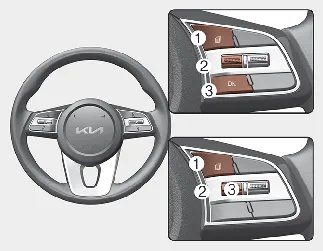
-
 : MODE button for changing display modes
 -
 /
/  : MOVE switch for changing items
 -
OK: SELECT/RESET button for selecting, confirming, or resetting the highlighted item
LCD display modes ➤
Trip information (trip computer) ➤


Other information:
Kia Seltos SP2 (2021-2026) Owner's Manual: LCD display modes
You can switch between LCD display modes by pressing the Mode button. The available screens may differ depending on the Kia Seltos trim level, equipment, and active vehicle systems. Mode Driving Assist Trip Computer TuKia Seltos SP2 (2021-2026) Owner's Manual: Highway Driving Assist (HDA)
Highway Driving Assist (HDA) in the Kia Seltos is designed to help detect vehicles and lane markings ahead. When operating on supported highways, it can help maintain distance from the vehicle ahead, maintain the set speed, and help keep the Kia Seltos centered in the lane. NOTICE HDA is available only on controlled-access roads of certain highways.