Digital Key System Operation Verification
|
–
|
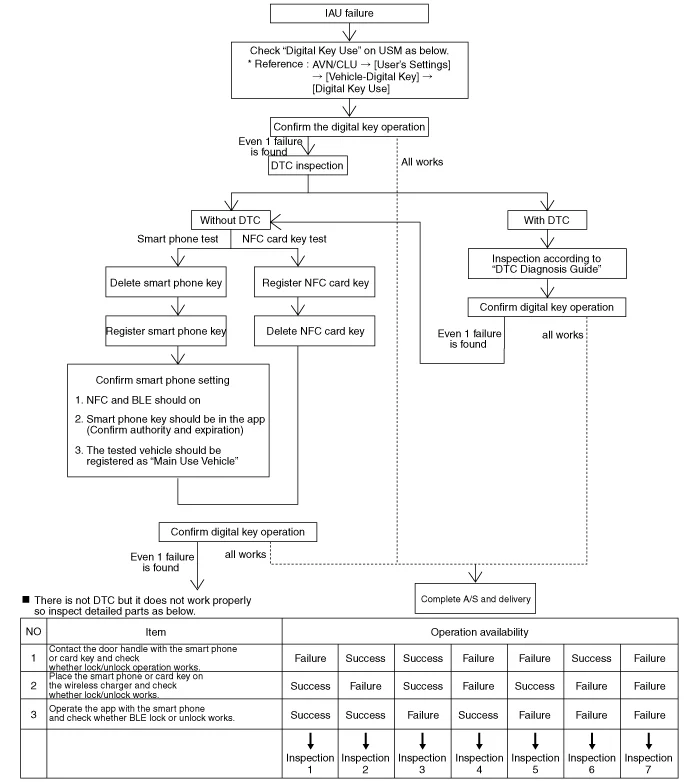
When the digital key system failure occurs, the system operation should be confirmed as below.
|
| 1. |
Contact the NFC antenna embedded spot of the door handle with your smart phone or key card to confirm
lock/unlock function.
|
| 2. |
After placing your smart phone or key card on the wireless charger, you should confirm whether the
start-up operation works.
|
| 3. |
You should confirm whether BLE lock or unlock are operable with your smart phone.
|
| 4. |
If there is digital key system failure, you should inspect with the following “Digital Key System A/S
Procedure�.
|
Digital Key System A/S Procedure
|
•
|
To inspect the digital key, vehicle owner’s smart phone or NFC key card is required. If you do
not have both of those, you should register new NFC key card and complete the test before delivering
the vehicle.
|
|
•
|
Once a new NFC key card is registered, the existing NFC key card is not available.
|
|
Inspection 1 :
Check whether the door handles of driver’s seat and passenger’s seats work properly. If the door
handle of the driver’s seat fails to operate, the handle should be checked after replacing with
passenger’s seat door handle.
If it works properly, only the door hand of driver’s seat should be replaced since it does not
have problem with wiring.
If both of those handles do not work, the door handles of driver’s seat and passenger’s seat
should be replaced with a new handle to check whether it works properly.
If it performs normally, the handle should be replaced with a new one. However, there is a
malfunction in the part, you assume or occurs and process inspections in accordance with “DTC
Diagnosis Guide�.
|
|
Inspection 2 :
Check whether turn the vehicle on with the digital key (smart phone or key card) after replacing
with new wireless charger.
If it works properly, the vehicle can be delivered with the function on since it does not have a
problem with wiring.
If it does not work even after replacing with a new product, the wireless charger wiring should
be checked.
|
|
Inspection 3 :
Process above “Inspection 1� and “Inspection 2� in order.
|
|
Inspection 4 :
After replacing with a new IAU, “IAU-IBU learning� should be proceeded.
If it operates without any problem after processing from No.1 to No.3 with the digital key, the
vehicle can be delivered with the function on since it does not have a problem with wiring.
If it does not work, you assume that occurs and process inspections in accordance with “DTC
Diagnosis Guide�.
It still does not operate, “Inspection 1�, “Inspection 2� should be processes in order.
If one of those works normally, wiring of other cases should be inspected. If all of those do not
work at all, all of them should be replaced with new IBUs to process "EMS/FOB learning" and "IAU-IBU
learning"
All of the IAUs and IBUs are replaced with new products so “Inspection 1�, “Inspection 2� should
be processes in order to check whether the system works properly.
|
|
IAU-IBU Learning Status Inspection
|
Digital key function works only when the learning states of IAU and IBU are learnt.
|
| 1. |
Perform the "Status Information" with the KDS.
(S/W Management → Identity Authentication Unit → Status Information)
|
Refer to the KDS screen for operating conditions and details
|
Mark
|
Description
|
Learning status
|
Virgin
|
Initial state
|
Non-learning state
|
Learnt
|
Learning completion state
|
earning completion state
|
Neutralized
|
Neutral state
|
Non-learning state
|
|
Smartphone Key Registration Status Inspection
|
Smart phone key registration status can be checked via "Data Analysis".
|
| 1. |
Connect the KDS to vehicle.
|
| 2. |
Select the "Data Analysis" and "IAU".
Mark
|
Description
|
Owner's smart phone resigtration state
|
0 : Main user's smart phone is not registered.
|
1 : Main user's smart phone is registered.
|
Number of currently registered digital key (smartphones)
|
0 : No registered phone
|
1-4 : Currently registered device number
|
|
NFC Key Card Registration Status Inspection
|
NFC key card registration status can be checked via "Data Analysis".
|
| 1. |
Connect the KDS to vehicle.
|
| 2. |
Select the "Data Analysis" and "IAU".
Mark
|
Description
|
Number of currently registered digital key (card key)
|
0 : No registered card
|
1 : 1 registered card
|
|
IAU-IBU Learning Procedure
If you replace any of IAU unit and IBU unit, “IAU-IBU Learning� should be processed.
|
•
|
You should notify the following items to the customer after completing the vehicle repair.
|
|
–
|
If IAU-IBU learning is processed, the existing smartphone key and NFC key card are deleted.
(In this case, smart key information is not deleted so only smart key can turn on the vehicle.)
|
|
–
|
You should notify that the smart phone key and NFC key card should be re-registered necessarily.
|
|
–
|
To re-register the smart phone key, the digital key initialization of the vehicle owner’s smart
phone should be processed.
After initializing the smart phone key, you should re-register the smart phone key.
|
|
–
|
NFC key card should be re-registered and the existing NFC can be re-registered immediately.
(New NFC key card can be registered and used.)
|
|
| 1. |
Perform the "Learning Mode" with the KDS.
(S/W Management → Identity Authentication Unit → Learning Mode)
|
Refer to the KDS screen for operating conditions and details
|
|
Neutralization mode
| 1. |
Perform the "Neutralization mode" with the KDS.
(S/W Management → Identity Authentication Unit → Neutralization mode)
|
•
|
If you re-use IAU or IBU to another vehicle, you should process Neutralization mode.
|
|
•
|
Refer to the KDS screen for operating conditions and details
|
|
|
Other information:
Kia Seltos SP2 (2021-2026) Service Manual: Limitations of the System
Digital Key 2 Touch may not work properly if any of the following occurs:
The smart phone battery or the vehicle battery is discharged.
NFC or Bluetooth is turned off in the smart phone settings.
A credit card is placed on the back of the smart phone, or a metal or thick smart phone case is used.
Kia Seltos SP2 (2021-2026) Service Manual: Limitations of NSCC
Navigation-based Smart Cruise Control (NSCC) in the Kia Seltos may not operate properly under certain road, navigation, weather, or system conditions. The driver must always monitor the road and remain ready to control speed manually.
The navigation system is not operating properly.
Map information is not transmitted because of abnormal infotainment system operation.



